Text message program
PostScript Pharmacy text notifications
Optional text-message updates about your prescriptions and orders — from Cumulus Pharmacy LLC, doing business as PostScript Pharmacy. Texting is always your choice, never required, and never used for marketing.
What the messages are
If you turn on text notifications, PostScript Pharmacy sends you short, strictly transactional updates about your own pharmacy account. Message types:
- Prescription notices (for example, a new prescription is on file for you)
- Order status updates (for example, your order has shipped or been delivered, or your package is waiting at the carrier’s location)
- Delivery problems (for example, a delivery issue with your package)
- Order changes (for example, an order was cancelled)
- Account notices that need your attention (for example, a payment issue or a refund)
These are account notifications only. We never send marketing, promotions, or advertising by text.
Example messages you might receive:
- PostScript Pharmacy: A new prescription is on file for you. Open the app to view. Reply STOP to opt out.
- PostScript Pharmacy: Your prescription is on file. Open the app to view details. Reply STOP to opt out.
- PostScript Pharmacy: Your order status has been updated. Open the app for details. Reply STOP to opt out.
- PostScript Pharmacy: Your order has been delivered. Open the app for details. Reply STOP to opt out.
- PostScript Pharmacy: Your package is available for pickup at the carrier location. Open the app for details. Reply STOP to opt out.
- PostScript Pharmacy: There is a delivery issue with your package. Open the app for details or call (603) 788-2265. Reply STOP to opt out.
- PostScript Pharmacy: Your order has been cancelled. Open the app for details. Reply STOP to opt out.
- PostScript Pharmacy: Action needed on your account. Please open the app for details. Reply STOP to opt out.
- PostScript Pharmacy: You have an account update. Open the app for details. Reply STOP to opt out.
How you opt in
Text notifications are off by default. You turn them on yourself — we never enable them for you, and consent is never a condition of buying anything from us. There are three ways to do it: two in the PostScript Pharmacy app (iOS, Android, or app.postscriptpharmacy.com) and one by text.
When you set up your account
The last step of setting up your account has a box that starts unticked:
Text me pharmacy updates, like when a new prescription arrives, when my order ships or is delivered, and if there's a problem with an order or payment. Msg frequency varies. Msg & data rates may apply. Reply STOP anytime to opt out.
Ticking it is your affirmative opt-in.
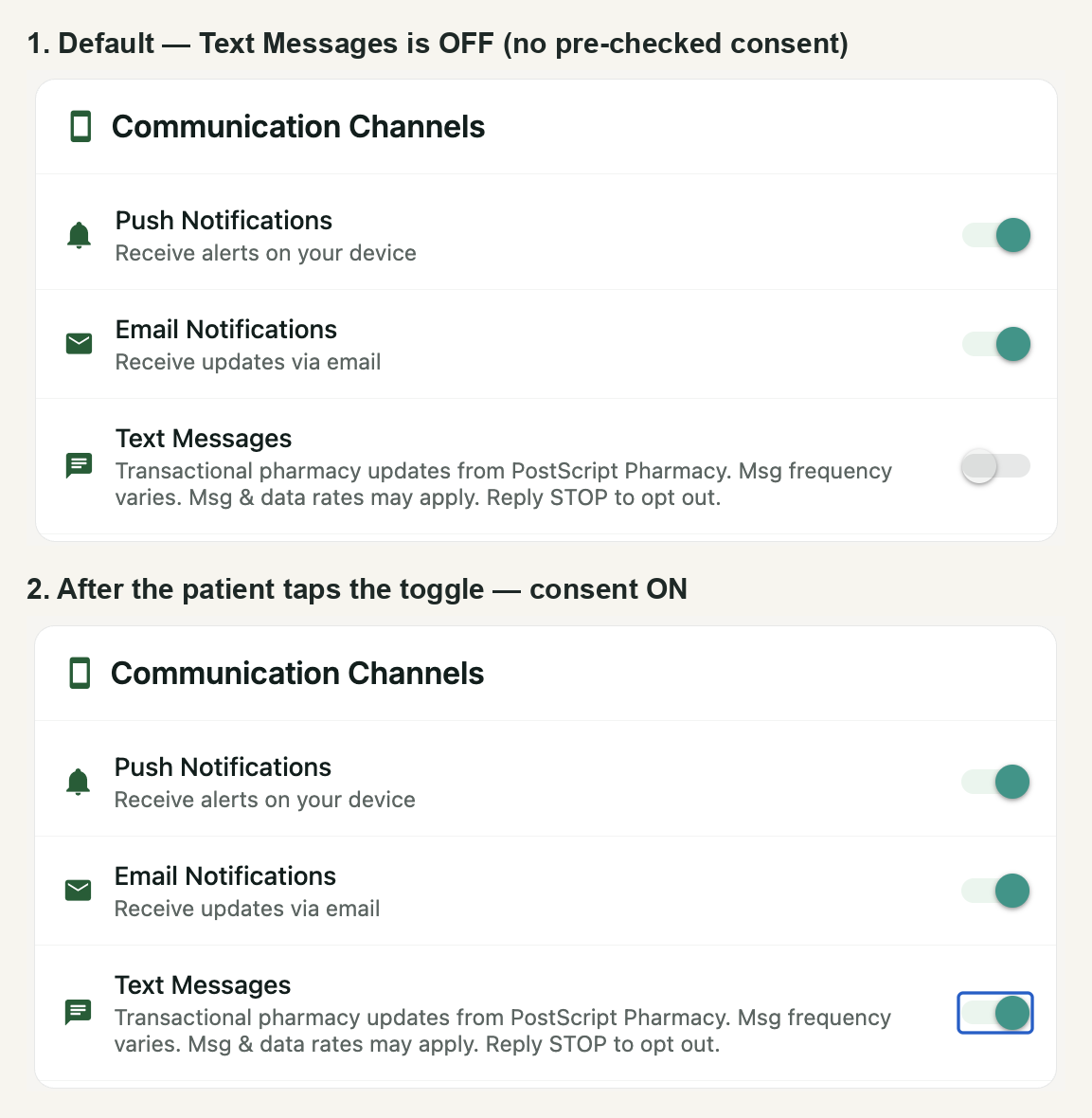
Any time, in the app
- Open the PostScript Pharmacy app and sign in to your account.
- Go to Profile → Notification Settings.
- Turn on the Text Messages toggle. It starts in the off position; switching it on is your affirmative opt-in.
By text
If you have a PostScript Pharmacy account, text JOIN to (970) 425-1594 from the mobile number on your account. We confirm:
PostScript Pharmacy: You are opted in to pharmacy text notifications. Msg&data rates may apply. Msg frequency varies. Reply HELP for help, STOP to opt out.
Each way, we record the date and time of your consent on your account.
Message frequency & rates
Message frequency varies and depends on your own account activity — you only receive a text when something happens on your orders or prescriptions. Message and data rates may apply, depending on your mobile carrier and plan.
STOP and HELP
Reply STOP to any message to unsubscribe. You will receive one confirmation and then no more texts:
PostScript Pharmacy: You are unsubscribed from text notifications. No more messages will be sent. Reply HELP for help or call (603) 788-2265.
You can also say it in your own words. If you reply with something like “please stop” or “no more texts”, we treat it as STOP.
You can also turn text messages back off any time in the app under Profile → Notification Settings.
Reply HELP for help, or contact us directly:
PostScript Pharmacy: For help call (603) 788-2265 or visit postscriptpharmacy.com. Msg&data rates may apply. Reply STOP to opt out.
Your number stays private
We do not sell, rent, or share your mobile phone number or your text-message opt-in with any third parties or affiliates for their marketing or promotional purposes.
Your number is used only to send you the pharmacy account notifications described on this page. Full detail is in our Privacy Policy and Terms of Service.
Program: PostScript Pharmacy Patient Notifications. Operated by Cumulus Pharmacy LLC dba PostScript Pharmacy (EIN 39-3717288) · 16 Church Street, Lancaster, NH 03584 · (603) 788-2265 · don@postscriptpharmacy.com. Text notifications are optional account notifications for existing customers and are never a condition of any purchase. Standard message and data rates may apply. Reply STOP to cancel, HELP for help. See our Privacy Policy and Terms of Service.